
SDS Clock3.3 - Google Play
You'll be able to see results in few seconds.
Publisher Description
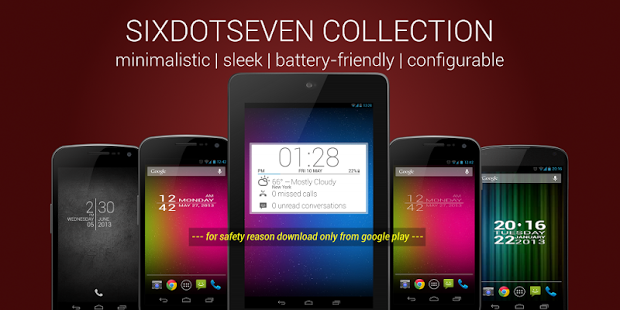
SDS Clock a minimalist and sleek designed home screen digital clock and date widget with size of 4x1. Launcher for your favorite apps (like alarm clock, calendar). Support device language.
NEWS New font style gives a sleeker design published with version 3.3
Bug fixes, and better compatibility for newer android version (ICS, JB) are published with version 3.2.
--- for safety reason download always from google play ---
FEATURES
✓ Two Tap launcher. Select apps which you are used very often (Alarm Clock, Calendar, ...).
✓ Battery/state of charge show in percent
✓ Select between two faces streched and no streched
✓ Select color and transparency of the widget background
✓ Select color of font
✓ Select shadow on/off
IMPORTANT NOTES
➀ Depending from the performance of your device and the amount of installed application it can take some time before you will see the configuration page, be patient.
➁ If you're using killer apps, add the service SDSClockService to the ignore list.
➂ This is a homescreen widget and not a regular application: It does not "run" from the Applications Drawer, in fact you won't even find its icon there, when the install completes.
INSTALLATION
prior Honeycomb:
➀ Long press empty space / select from widgets tab
➁ Select Widgets
➂ Select SDS Clock
after Honeycomb:
➀ Long press on SDS CLOCK from widget tab of drawer.
➁ Drop on empty space.
ADVICE
► Changing setting made easy.
If you want to change a setting afterwards, just put the Clock in the Trash and reload it again.
The configuration screen pops up and all previous setting are in place. Change your settings and press OK. That's it.
► If you are not sure whether you'll like it or not, there is also a lite(free) version of SDS Clock.
OPEN SOURCE NOTE
SDS Clock use the library color-picker-view. This library is licensed under Apache License 2.0, honor and thanks go to Daniel Nilsson and Sergey Margaritov. You will find the code under http://code.google.com/p/color-picker-view/ or send an email to opensource-cpv(at)sixdotseven.com.
Thanks for your comments and also check out other great and best clock widgets by sixdotseven, here on the market!
About SDS Clock
The company that develops SDS Clock is sixdotseven. The latest version released by its developer is 3.3.
To install SDS Clock on your Android device, just click the green Continue To App button above to start the installation process. The app is listed on our website since 2013-07-01 and was downloaded 0 times. We have already checked if the download link is safe, however for your own protection we recommend that you scan the downloaded app with your antivirus. Your antivirus may detect the SDS Clock as malware as malware if the download link to com.sixdotseven.sdsclock is broken.
How to install SDS Clock on your Android device:
- Click on the Continue To App button on our website. This will redirect you to Google Play.
- Once the SDS Clock is shown in the Google Play listing of your Android device, you can start its download and installation. Tap on the Install button located below the search bar and to the right of the app icon.
- A pop-up window with the permissions required by SDS Clock will be shown. Click on Accept to continue the process.
- SDS Clock will be downloaded onto your device, displaying a progress. Once the download completes, the installation will start and you'll get a notification after the installation is finished.
Program Details
System requirements
Download information
Pricing
Version History
version 3.3
posted on 2013-07-01
Version 3.3: New font style, select 'Font Style Light' in the display settings of the clock and check out the new sleek design.,Version 3.2 (Bug fixing),- ICS/JB compatibility,- widget preview,- widget resize (minumum size 4x1),- unstable situations
version 2.2
posted on 2011-04-28
Several fixes and updates
Disclaimer
Official Google Play Link
We do not host SDS Clock on our servers. We did not scan it for viruses, adware, spyware or other type of malware. This app is hosted by Google and passed their terms and conditions to be listed there. We recommend caution when installing it.
The Google Play link for SDS Clock is provided to you by apps112.com without any warranties, representations or guarantees of any kind, so access it at your own risk.
If you have questions regarding this particular app contact the publisher directly. For questions about the functionalities of apps112.com contact us.
